Showing posts with label fake security alerts. Show all posts

Thursday, October 12, 2017

SofTech Computers explains why Prescott computer owners should be wary of anyone telling you that your computer is infected

In the course of computing, you may run across a scammer or two. These people are usually use scare tactics and lies to convince you that your computer is infected with a virus or has corrupted data. Softech Computers, your friendly Prescott computer repair store, is here to help you identify a scam and make sure that you don’t fall for this potentially costly trap.

SofTech Computers explains why Prescott computer owners should be wary of anyone telling you that your computer is infectedWhen you purchase a computer, whether through a reseller or through a computer shop like ours, everything is paid for. Apple and Microsoft are no longer in any way affiliated with you, you don’t owe them money, and will never contact you. These companies are in the business of selling new computers, not trying to get you repair your old one.

A common tactic of scammers is to say they are from Apple or Microsoft using either the phone or a website. Many times these phone calls or websites are obviously fake. Sometimes the scammers are better than the rest and are very convincing. Remember Apple or Microsoft will never contact you!

Here are some fake things to be on the watch for:

  • Trying to convince you that you have an infection, corrupted data, or malfunctioning hardware, or that you have done something illegal
  • Claiming they work for Microsoft, Apple, Google, IBM, HP, Dell, the CIA, the FBI, or any other company that might help in furthering their claims
  • Asking you to download software
  • Asking for the ability to remote control, or “remotely fix” your computer
  • Asking you to purchase something or give out your credit card

If you happen to take the bait and let the scammer connect to your computer and remotely control it, they will generally claim to run “scans” of some kind. These scans will always claim that they found some sort of problem, and proceed to attempt to charge you a far higher than standard amount of money to fix it. If you accept, you will have a program installed on your computer that will constantly collect data about you and potentially lead to identity theft. If you refuse, you will become locked out of your computer and all your data will be lost.

What can you do?

The best advice is to not call any numbers on the screen, close any browser windows that notify you of any viruses. If you have let these individuals into your computer, SofTech computers urges you to contact us today to have your computer checked out by a local specialist that you trust.

Fear not, because even if you end up (or have ended up) falling for this trap, there is some good news. At SofTech Computers, your locally owned computer repair service in Prescott, can almost always recover your data and get you back on track to a happy and safe computer experience. Give us a call at 928-443-8770 or visit our website at http://www.softechcomputers.com for more information.

More Information
Virus Removal in PrescottPrescott Malware RemovalHelpful Articles


Tuesday, August 8, 2017

Hang Up and Call Softech Computers in Prescott - A Simple Warning

Call SofTech Computers in Prescott for spyware removal and ransomware removal.
The phone rings and we want to be a good sport, pick up the phone and say hello. With the smart phone it’s easy to tell who the caller is, if the number matches one in our contacts. When it’s a number we don’t recognize, some of us want to do the better thing and answer the phone to save time and take care of the situation now. The voice claims to be Microsoft warning us that our computer has a virus. Before you panic and wonder what to do next, hang up! That’s right, hang up! These are two words of the wise from SofTech Computers in Prescott.
   
You’re thinking that this is rude, but it’s not. What the person on the other end of the line is attempting to do is far worse. We see victims on a daily basis – people who stayed on the phone long enough to be intimidated and scared half to death while thinking that someone from places unknown is about to take the computer out of peril. This is a scam. It is a crime. This doesn’t happen only in Prescott, it’s a global issue. Phone scammers get away with this because they’re difficult to stop and monitor.

Here is what they do:

•    They will trick their way in and call you on your cell phone – It doesn’t take a landline anymore.
•    Claim that they are employees of Apple, Google, or Microsoft.
•    Install harmful malware onto the device, desk top computer, laptop, or smart phone.
•    Install a program that will in turn install a virus and monitor every keystroke you make to steal passwords.
•    Steal your data.

Most of these calls take place during the middle of the day targeting the elderly or unemployed. These are the most vulnerable and gullible groups. The only way to stop this crime is to be aware; it’s all you can do to protect yourself. There’s no way to know what these criminals are getting away with, or how much money they are making.

Softech Computers would like to remind you that you have the power to hang up. Hanging up is the most useful tool we have in fighting off these scammers. If you receive a call like this and you’re still not sure, hang up and call Softech computers for advice at 928-443-8770. We’re happy to take a look and show you in person whether or not your computer has a virus. Put your trust in us, your local computer guys, to diagnose any problems and remove any potential virus. Check our website at http://softechcomputers.com/

More Information
Computer Virus Removal in Prescott
Prescott Computer Virus Removal
Helpful Articles


Wednesday, July 5, 2017

How to Avoid Online Computer Scams - Brought to You by SofTech Computers

The internet has given us more information and unique ways to conduct business than we could possibly dreamed of in years past. The wonderful world of the internet comes with a word of caution: Watch out for online scams. These are schemes to con you out of your money using your computer and the internet, either through fake websites or emails. You could be scammed through your smartphone, tablet, or computer.
SoftTech Computers in Prescott talks about avoiding online scams. See SofTech for computer tune-up, virus removal and data backup
SofTech Computers in Prescott has some tips to protect yourself. You can cut down the chance of scammers stealing your identity and cash:

•    Create passwords which are long, with random numbers. Do not use numbers associated with your birthday or social security number. Use upper and lower case numbers in addition. The longer the password the harder it is to guess. Ten digits are better than eight. Change your passwords often, and don't share them with anyone.
•    Install antivirus software and keep it up to date. This will check for malicious computer programs and monitor files before they are opened. Purchase the latest software for the best protection against viruses. If you purchase software online make sure it is from a trusted supplier.
•    Understand which software you are installing on your computer or phone and make sure you are using a secure site when you buy software, a tablet or a smart phone.  A secure site will have a web address beginning with https not http
•    Make sure that your firewall is turned on. A firewall is a security shield that stops scammers getting into your computer. Operating systems such as Windows come with built in firewall settings. They can monitor and warn you of unexpected access to your computer
Install updates to your operating system on a regular basis. Windows is an example of an operating system
•    Install the latest version of your web browser, for example Internet Explorer, which will have the latest security features.
•    Don’t open emails, email attachments, texts, or pop up messages from someone you don't know. These emails will have awkward or broken English.
•    No genuine online company will contact you to ask for your log-in details, such as your password or user ID. Only provide this information when you are logging onto a service that you are familiar with and trust, such as online banking.
•    Before entering payment card details on a website, make sure the link is secure.

 Make sure you have a secure link. Here’s how:

•    Make sure there's a padlock symbol in the browser window frame. This appears when you attempt to log in or register. Be sure the padlock is not on the page itself – if it is this could indicate it's a fraudulent site
•    Make sure that the web address begins with ‘https://’. The ‘s’ stands for ‘secure’
If you have opened a scam email:
•    Don’t reply to the email
•    Don’t click on any links in the email or open any attachments
•    If you have already clicked on a link and opened a website, don’t provide personal information.

If you believe that your computer has a virus, see our experts at SoftTech Computers in Prescott. We specialize in computer repair, computer maintenance, and virus and malware removal. If you are not sure which updated operating system, or browser to install, SofTech Computers can help with that too. We specialize in computer repair in Prescott. Visit us online at  http://www.softechcomputers.com/ or call 928-443-8770

More Information
Prescott Computer Repair
Computer Specialists in Prescott
Helpful Articles


Friday, June 9, 2017

Why computer maintenance is important and informative by Softech Computers in Prescott.

Why computer maintenance is important an informative notice by Softech Computers in Prescott.
Computer maintenance should be included in your daily, weekly and monthly routine and Softech Computers in Prescott Explains why. From the basic to the most expensive computers on the market without proper computer maintenance you may not be getting what you paid out of the computer.

Speed of the computer and your network.

Computer hard-drives are complicated and unfortunately, they are not the best design. Over the course of saving, copying, deleting and moving files in side of your computer you are in a simple way to describe it, throwing all of your photos, documents and programs into a theoretical box and shaking them up. The files are not all in the same place on the hard drive, the computer keeps a location for each file and references it. Over the course of time this gets a bit messy and the computer slows down, taking longer to retrieve information as well as respond to requests by other computers for that information. The slowness we have all experienced, it can be maintained and prevented with basic monthly maintenance.

Early Detection of problems

Checking for failing drives, memory or other possible issues before they actually fail and then cause more damage PLUS cost more to repair.

Running various on board system and external tools to check for hardware and software problems early on can save you time and money. More than 75% of the time we see problems come in that could have been prevented and addressed prior to catastrophic failure. In an example, over 50% of the population has hard drives that have moving parts in them, meaning they are not like the flash style memory of the solid-state drive. These moving parts slowly wear down, addressing the replacement and cloning of the drive prior to the failure of the drive could save $1,000-$2,500. When these drives fail and become damaged they need to be sent off for data retrieval and this means sending them out to a specialist. It is a very costly and lengthy process, and in many cases, you will still lose a large chunk of what was saved. Early detection is a must for all types of users. Protect the things that matter the most.

Keeping Antivirus Programs and definitions up to date

Many users assume that having a virus program installed in your system is all that you need and that it will work on its own without any input from them. For a lot of the time this can actually be true, but, from time to time there are actions that must be performed by the user that helps clear the system of infected files, running system checks for possible security breaches, updating virus definitions, and insuring that the Anti-Virus program has not become compromised by checking system files. Having a go to Tech for these these things can be extremely helpful for any user because after all its what they live for.

Preventative measures against Viruses, Trojans and other nasties

The terms viruses, spyware, trojans, and worms are all subcategories of malware which by definition is the words ‘malicious’ and ‘software’ combined. They are designed with many different purposes and we can assure you none of them are things that you want. Even if something was seemingly harmless, their intent is to disrupt your day to day and in many cases, destroy years of your work and or memories.

Your photos, documents and system files are important to you, trusting those things to chance is a game of roulette where the user eventually loses it all, it’s just a matter of time. Researching current trends, daily news articles and understanding various behaviors of viruses are an important aspect to anyone’s day to day. When it cannot always be addressed things get forgotten. Ask yourself how much your photos; the memories, and your documents; the hard work, are worth to you. Having a maintenance service for keeping up on this for you is more than worth it.

Keeping Operating system and programs up to date

Computers change constantly as new technology is applied and even more so as new programs are developed. This leaves your computer open and vulnerable. No matter how good a program is written there is always the eventual problem of that program having an error or bug on various computer systems. The programmers of those programs most times will attempt to correct these issues and come up with a fix for them, unfortunately the fix is not always easy to understand and implement, and sometimes it’s not so much the fix you were looking for and it ends up causing more harm than good. Knowing how to respond to updates and implement them as well as correct the problems that come with them is a task, leave that up to your maintenance team.

At Softech Computers in Prescott hope that this helps you understand why having a maintenance plan implemented is very important and that you are better able to see the benefits to keeping things updated, cleanup, and protected. We have a special maintenance program you should consider, the SofTech One Plan will keep you protected! Contact us at 928-443-8770 or visit our website to lean more http://www.softechcomputers.com/oneplan.

More Information:
Computer Maintenance in Prescott
Prescott Malware Removal
Helpful Articles

Wednesday, May 24, 2017

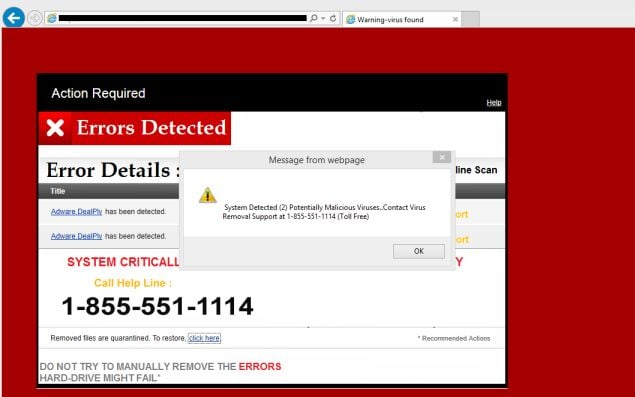
Fake Important Security Alerts - SofTech Computer Repair in Prescott discusses how to deal with this popup message when using the internet

Fake security alerts - Malware removal from SofTech Computer Repair in Prescott
Have you ever been browsing the internet and get a message that says "your computer is infected" or "important security alert" message? These messages are actually fake notifications attempting to gain access to your computer or obtain your credit card information.

These alerts are shown in such a way as to trick the computer's user into thinking their computer has crashed or that a virus has been detected on the computer. It does this to try and scare the infected user into calling one of the listed numbers in order to receive support. In reality they will only be greeted with people who are trying to sell them unneeded support contracts and services.

What should you do if you see this warning?

First off, do not call any phone numbers on the screen, and do not enter any contact information into the popup.

Usually this popup comes as the result of browsing the internet and are simple javascript popup messages. Simply closing the browser window or pressing the "ESC" key on your keyboard will cause the message to disappear, however many times the popup usually returns shortly after if you remain on the web page.

How do you get the popup to go away?

We have seen this popup many times. The easiest way to escape this popup message trap is to hover your mouse pointer over the browser's close button, hit the "ESC" key on your keyboard, then quickly click the mouse button to close the browser.

This may take some practice, however this is the simplest and fast way to avert the announcing popup loop.

What if this does not work?

If the above mentioned steps above do not work, your computer could be infected by other malware. It is important to have your computer checked for malicious malware as soon as possible.

SofTech Computer Repair in Prescott is available to help you though this issue! Do you have persistent computer issues? Contact us today about our computer maintenance plan. Call us today, 928-443-8770 or learn more at http://www.softechcomputers.com/?p=15633795825629a4e400e05

More Information:
Malware Removal in Prescott
Prescott Computer Repair
Helpful Computer Articles