Showing posts with label malware removal. Show all posts

Wednesday, November 29, 2017

SofTech Computers discusses malware removal in Prescott

malware and virus removal in Prescott by SofTech Computer Repair
As a computer owner, it is important to understand some of the things that might affect your computer. SofTech Computers, local Prescott professional for malware removal, would like to give you a little more information since it affects many computers every day.

Most computer users have heard about “viruses” that can attack your computer. A virus is a specific type of malware and the term is more familiar to the public. Malware is malicious software that is written to harm and infect a computer. Here are some types of malware:

Virus: This is a specific type of computer code that is contagious and infects other software on your computer. Once opened and shared, it can also spread to other computers.

Trojans: This is a type of virus that is designed to make the user think they it is a safe program and OK for them to run. They are often programmed to steal personal and financial information and in some cases to take over the resources of the computer’s system files.

Adware: Adware is advertising-supported software. It is designed to examine which Internet sites you visit frequently and then presents ads based on your usage. Not all adware has malicious intent, but it can slow down the performance of your computer.

Spyware: This malware actually spies on you and tracks your activity. This software allows a hacker to gain information about the computer user and is often very hard to detect.

Worms: This type of malware will replicate itself and destroys information and files saved on the computer, including the system operating files.

Ransomware: This is an advanced type of malware that restricts access to your computer system until the user pays a fee. It may show up as a pop-up warning stating that you have been locked out of your computer with a phone number to call to “get help”.

We all depend on our digital devices for online purchases, communication, online banking and more. In order to protect your devices from malware, it is important to have an effective virus/malware solution. The easiest solution is to bring it into one of our technicians at SofTech Computers in Prescott, where we can check your system for malware, and discuss options to help keep your computer safe and secure. Contact us at 928-443-8770 or visit our website at http://www.softechcomputers.com.



More Information:
Virus and Malware Removal in Prescott
Prescott Computer Maintenance
Helpful Computer Tips

Friday, October 27, 2017

What makes a good computer a great computer? - SofTech Computers in Prescott

Do you like to play games? Does your job involve image or video editing? How about high-
quality sound recording? If you said yes to any one of these or just want a screaming fast
computer, you might be wondering what exactly makes a computer high quality. Well, SofTech
Computers, Prescott's leading computer repair and service shop, is here to explain the
difference between okay and enthusiast hardware, and what you should choose for your needs.
Each computer has 7 main parts that can make or break a system:
What makes a good computer a great computer? - SofTech Computers in Prescott
Enthusiast Computers are on fire - not literally though

  • The CPU - This is the main “brain” of the computer and can seriously make or break the performance of a computer. The main thing that the average consumer needs to know about processors is that having more cores and more speed means a faster computer. 4 cores is the current standard, with specialized hardware running all the way up to 16 cores.
  • The Motherboard - This is where all of the stuff sits, and is one of the most common things to go bad on a computer. While there are a lot of different things that are important to a system builder like SofTech, the gist of it is that higher prices equals better lifetime and better future proofing.
  • The RAM - RAM is basically short-term memory -- having too much is unnecessary, and having too little can really slow you down. Depending on the application, RAM can typically range from 4GB to 32GB or more.
  • The Graphics Card/Chip - The graphics device determines how fast you can play video games, edit high quality images in things like Photoshop and videos in things like AfterEffects, as well as speeds up the entire computer a little bit. If you are doing anything besides sound recording and light web browsing, a graphics card could be right for you. These range in price from $30 to $800 depending on the application and quality desired.
  • The Sound Card - A sound card can be very important for people dealing with video or audio production, as it can allow for hookups to things like high quality microphones, guitars, and pianos, as well as produce high quality audio output. If you aren’t working with studio quality sound, the built-in sound card that every computer has should be enough.
  • The Storage - What type of storage device you use in your computer is the main thing that makes the difference between low end and high end. There are two types of storage: hard drives and solid state drives (SSDs). Standard hard drives are usually for lower end devices and solid state drives are generally used in high end devices... An SSD is a great addition to any computer to increase its speed and longevity. Another consideration when talking about storage is the amount. You might want to consider getting fast storage in a small quantity and slow storage in a large quantity if you edit videos or pictures, or play lots of video games. Ask SofTech Computers about how you can replace your traditional drive with a SSD today!
  • The Case - Finally, the case is the thing you see on the outside. It holds your CD drive, your USB ports, and all of your other inputs and outputs. A higher quality case will also contain fans and other cooling devices that can help keep higher end or enthusiast parts cool under a large workload.

So, now you know what all of the parts do, what do you need? Do you need a good CPU and
graphics card, but not a good sound card? Maybe you need a soundcard and a good case with
lots of inputs to hook up all of your instruments and microphones. Or maybe you want to play
video games at the highest speeds. The higher quality parts of each type equate to an overall
higher quality computer.

Whatever your needs are, SofTech Computers in Prescott – Your Local Hometown Computer
Heroes, can help you make the best decision for your money. You just tell us what you need to
do, and we can help you do that, while sticking within almost any budget. If you are looking into
getting an enthusiast computer or upgrading your own, give us a call at 928-443- 8770 or visit
our website at http://www.softechcomputers.com for more information or to get a quote on how
we can help you meet your computing needs.

More Information
Virus Removal in Prescott
Prescott Computer Repair
Helpful Articles

Wednesday, October 18, 2017

Proper precautions for keeping your laptop safe when traveling - SofTech Computers in Prescott

Most people travel light - some clothes, a couple things to do on the plane or in the car, your cell phone, and a laptop. Little do they know that bringing a laptop with you can present a lot more hazards than you might expect. From extra trouble with the TSA to hassles with Wi-Fi, it can be a real burden to bring your laptop places. Fortunately, SofTech Computers, Prescott’s hometown computer heroes, can help you make your travel experience less stressful and more what travel should be - FUN!

Proper precautions to keep your laptop safe when travelling - SofTech Computers in PrescottAirplanes - If you plan on traveling by air, you might want to consider carrying your laptop in an easy to access bag and or in the front pouch of your carry on bag. All airports in the United States now require that you put your laptop and all other large electronics in a separate container for x-ray scanning. You can save yourself a lot of hassle if you are prepared for that. Also, if you are carrying sensitive media like internal or external hard drives, solid state drives not enclosed in a metal housing, or tape drives (not cassette tapes), you should ask the TSA for an alternate screening of those items, as they are what is considered “x-ray and magnetic sensitive media”.

Cars - If you’re bringing your laptop on a trip that is particularly bumpy, like an off-roading trip or a trip where you know you’ll be going down a very bumpy road, we would like to advise you that you should not use your laptop during that time, and even go as far as consider investing in a foam case or pad of some kind that can help absorb the shock from the small bumps. These bumps can really wear on a computer and potentially cause it to die faster than expected.

Wi-Fi - Next, we would like to advise you about security when using Wi-Fi on your laptop. Only trust your friends’ and family’s Wi-Fi connection as secure. Any Wi-Fi that isn’t secure, or that doesn’t need a password to connect to is ill-advisable for anything containing personal information -- passwords, online banking, etc. You should refrain from using your laptop or any device connected to the Wi-Fi if you need to do these things. A great alternative would be using your smartphone as a hotspot, or using a Mi-Fi hotspot because, while they can be expensive, they are the most secure way to bank on the go. Or, purchase a VPN and avoid all the hassle to begin with. If you’d like to know more about VPNs and how they can help you, call SofTech Computers.

Desktops - These tips were relating to Laptops and travel, but what if you are going to somewhere for an extended trip or need to use all of the computing power of your desktop? Always keep your computer on its side, not standing up. Plus, you might want to consider bringing your computer to SofTech to travel-proof it. This constitutes making sure that everything is in place and that there is little to no movement among the parts of the computer. Overall, it is not advisable to move desktops over long distances frequently, and can seriously hurt the life of the machine.

Have more questions about travel safety when it comes to your laptop and personal information? Give SofTech Computers, your local Prescott computer repair shop, a call. We’re always available to help you and would be happy to make sure that you are travel ready. We can be reached at 928-443-8770 or you can visit our website as http://www.softechcomputers.com

More Information
Computer Repair in Prescott
Prescott Virus Removal
Helpful Articles


Thursday, October 12, 2017

SofTech Computers explains why Prescott computer owners should be wary of anyone telling you that your computer is infected

In the course of computing, you may run across a scammer or two. These people are usually use scare tactics and lies to convince you that your computer is infected with a virus or has corrupted data. Softech Computers, your friendly Prescott computer repair store, is here to help you identify a scam and make sure that you don’t fall for this potentially costly trap.

SofTech Computers explains why Prescott computer owners should be wary of anyone telling you that your computer is infectedWhen you purchase a computer, whether through a reseller or through a computer shop like ours, everything is paid for. Apple and Microsoft are no longer in any way affiliated with you, you don’t owe them money, and will never contact you. These companies are in the business of selling new computers, not trying to get you repair your old one.

A common tactic of scammers is to say they are from Apple or Microsoft using either the phone or a website. Many times these phone calls or websites are obviously fake. Sometimes the scammers are better than the rest and are very convincing. Remember Apple or Microsoft will never contact you!

Here are some fake things to be on the watch for:

  • Trying to convince you that you have an infection, corrupted data, or malfunctioning hardware, or that you have done something illegal
  • Claiming they work for Microsoft, Apple, Google, IBM, HP, Dell, the CIA, the FBI, or any other company that might help in furthering their claims
  • Asking you to download software
  • Asking for the ability to remote control, or “remotely fix” your computer
  • Asking you to purchase something or give out your credit card

If you happen to take the bait and let the scammer connect to your computer and remotely control it, they will generally claim to run “scans” of some kind. These scans will always claim that they found some sort of problem, and proceed to attempt to charge you a far higher than standard amount of money to fix it. If you accept, you will have a program installed on your computer that will constantly collect data about you and potentially lead to identity theft. If you refuse, you will become locked out of your computer and all your data will be lost.

What can you do?

The best advice is to not call any numbers on the screen, close any browser windows that notify you of any viruses. If you have let these individuals into your computer, SofTech computers urges you to contact us today to have your computer checked out by a local specialist that you trust.

Fear not, because even if you end up (or have ended up) falling for this trap, there is some good news. At SofTech Computers, your locally owned computer repair service in Prescott, can almost always recover your data and get you back on track to a happy and safe computer experience. Give us a call at 928-443-8770 or visit our website at http://www.softechcomputers.com for more information.

More Information
Virus Removal in PrescottPrescott Malware RemovalHelpful Articles


Wednesday, October 4, 2017

With Winter incoming, SofTech Computers in Prescott explains why your machine could be slowing down

As the weather is getting colder, you might begin to be outside less and less. With all of this newfound indoor time, you might realize you’re using your computer a significantly more. Having a slow computer this Fall/Winter could really cut down on productivity, performance, and increase aggravation. SofTech Computers, Prescott's hometown computer repair shop, is here inform you of the plethora of benefits you can experience from getting a computer tune up this Fall.

What can cause computer problems?

Your computer could be filled with junk and adware - If you’ve ever opened your web browser and seen a search engine that isn't Google or Bing, you’ve probably been the victim of adware. Often companies will try to get you to install junk programs that can ruin your computing experience and lead to some serious frustration.

Your computer could contain excess programs
- If you’re like us, you probably have lots of programs that you rarely use on your computer. Well, you can’t get rid of them, can you? What if you need them again? Fear not, because we at SofTech can disable your programs for starting automatically, dramatically increasing speed and startup time, while keeping your programs on your computer for later use.

Your computer could be running out of space - Computers will store hundreds of thousands of files for quick access, but many of these files have only been used once or twice. And, to top it all off, the speed of modern computers makes it nearly pointless, as there isn’t usually a noticeable speed increase. A quick computer tune-up can free up much needed space, and even increase system performance.

Your computer could be overheating - Getting a tune-up doesn’t always mean cleaning up software, does it? Your computer can become filled with dust, and, if left long enough, can potentially cause overheating issues. Computers will slow themselves down to generate less heat and prevent damage. So if you have a dusty home (we won’t tell), you might want to consider bringing in your computer and getting it cleaned out.

Your computer could need updates - Updates can often fix annoying bugs and speed things up. But not always do they go smoothly: if an update gets stuck, your computer can be perpetually slowed down until the update goes though. By bringing in your computer for a tune-up, we can make sure that you are both current and have no stuck updates, making you more secure and speeding up your system.

Computer maintenance is the key!

As you can see, it’s definitely a good idea to bring in your computer and getting it tuned up. And, with the SofTech OnePlan, all of this cleaning, plus virus removals and all service charges on 3 computers are included for the whole year, all at one low price. That’s right, bring it to us each time you have an issue and we will fix it. What a deal! Call SofTech Computers today to find out how we can help you be more productive and have more fun on your computer. Questions? You can reach us at 928-443-8770 or visit our website at http://www.softechcomputers.com.

More Information
Prescott Computer Maintenance

Malware Removal in Prescott
Helpful Articles


Friday, September 29, 2017

SofTech Computers in Prescott Explains How to Keep Your Backup Physically Safe

Keeping your data backup safe in Prescott by SofTech ComputersSo you have your important files and documents backed up, but you have no need for it right now. How do you keep your data safe once it’s off the computer? Where should you store it? Is there anything I should avoid when storing my data? Fear not, because SofTech Computers in Prescott is here to answer all of your questions and more!

Depending on how you backed up your data, you will have to keep it tucked away in different ways. Some universal good advice is to keep your backup away from magnets and things that might spark. Make sure that your backup device is keep away from any liquids and in a cool, dry place. Keep the backup device away from any places where it might fall, or have objects fall on it. If you have to transport your device, try not to touch any of the ports or the metal on the cable after walking or driving a long distance with it. This could cause an electrostatic discharge and potentially cause problems. Finally, make sure that if you have to plug your backup device into your computer for any reason, eject the device before unplugging it from your computer. Failing to eject the device could corrupt data and cause issues.

If you used an online backup method, make sure that you have a strong password and multi-factor authentication (such as a text message confirmation on login). Anything less could leave your account vulnerable and susceptible to theft. It is also generally a good idea to keep your information both on the cloud and on a personal backup, in case you do end up being a victim of cybercrime. For the maximum amount of security, simply backup your most important files on a cheap 8GB flash drive and put in a drawer somewhere where you won’t forget it.

If you decided to do a full drive backup or disk clone, a good practice is to keep the drive off when not in use, and to not store any additional files on the same drive that you used for backup. The transferring of files between your computer and your backup drive wears out the drive and could potentially make you lose your data off of your backup drive. For that reason, it is a good idea to only put backup files on a backup drive, and nothing else. This will also help make sure that there won’t be any accidental deletions of files as well. Also, it generally isn’t a good idea to store your backups in your computer, because if the computer fails or gets taken over by ransomware, you will lose not only your data, but your backups as well.

Finally, make sure that only you and your trusted cloud service provider has access to your files. There are many scam companies that will try to sell you a place to store your information or have you send your drives for storage. These companies, at best, will usually look through your data, and at worse, hold it hostage from you. If you have a physical backup, never send it to anyone that you don’t trust, and if you have a digital backup on a cloud service, make sure that whoever your cloud provider is, that they are reputable and trustworthy.

Following these rules will keep your backups safe from the elements and others, as well as make sure that they are still there when you need them. These tips will keep your information as secure as an IT Professional would keep his. If you ever need assistance, run into trouble, or need advice about backups and data security in Prescott, call SofTech Computers at 928-443-8770 or visit us online at http://www.softechcomputers.com/ and we’ll be happy to help you.

More Information
Backups in Prescott
Prescott Data Recovery
Helpful Computer Tips

Friday, September 22, 2017

Special data backup methods for small business in Prescott - Tips from SofTech Computers

SofTech Computers in Prescott Explains Small Business Backup and Data Security Solutions
Businesses need more security that the average user, we all know that. But when it comes to backups and data security, what exactly does that mean? SofTech Computers in Prescott is here to explain the different enterprise level data backup solutions for keeping you and your customers data safe and secure. Here are some options that you may want to consider if you run a small business.

If you store large amounts of data, you might want to consider using a Redundant Array of Independent Disks, or RAID. RAID is an enterprise level data backup solution that involves spreading information over multiple disks, which gives it the ability to recreate the information on the disks if one of them fails. This ability gives the option to have little to no downtime when it comes to the availability of your data, and doesn’t use up any additional system resources, and actually may improve performance. This type of configuration will require something called a RAID Controller, which generally runs about $100-600, depending on how many disks you would like to use together. Generally, this type of backup setup is only used in servers, so unless you have a small server, you may want to consider the next options.

If you have many files that are often changed, like client information spreadsheets or databases, you might want to consider an incremental backup solution. Incremental backups work in a way that every time you change a file, that file is updated in the backup without having to run a full backup again. It only saves the changes on top, which saves system resources and has a minimal decrease in performance associated with it. If you might need to eventually look at historical copies of a document, a differential backup is a good idea. It works in the same way as an incremental backup, but instead of overwriting the file that was changed, it just makes a new copy in the backup. This would allow you to go through and find any files that were changed previous to the changes made.

The next type of backup you might want to consider is an easily deployable and very cost effective, but very basic in its features. If you don’t make a lot of changes to files, and don't mind potentially getting set back a little bit in the case of a failure, you could use scheduled full backups. This method takes a full image of your data and stores it in another place for redundancy. This is by far the most basic, but is quite effective for what it does, and can easily be paired both with the first and the final backup solutions, as well as paired effectively with a server for increased security and management.

The final backup option that we would suggest is called a virtual backup. Virtual backups work using a server to manage backups, and can additionally benefit from RAID setups and can add an extra layer of data protection if you really need it. This type of configuration uses a server to process information sent to it and catalog it in a organized fashion so that it is not only synced with the computer that it came from real time, but is also easily accessible to other users. This method benefits from a phenomenon called double backups, meaning that if the server were to break, all of the data is stored in the individual workstations, and if the workstation crashes, the data is stored on the server. Pair this configuration with RAID and you can have data nearly impossible to lose.

Proper data security can save you financially, as well as save you a lot of time and stress. Now that you know what kind of business level data security you would like to use in your business, call SofTech Computers at 928-443-8770 or visit our website at http://www.softechcomputers.com for more information about data security, or to schedule a consultation.

More Information:
Data Backups in Prescott
Prescott Computer Repair
Helpful Computer Tips

Wednesday, August 2, 2017

Fake Computer Virus Warnings from SofTech Computers in Prescott

Computer virus warnings in Prescott are common. Softech Computers can help.
Stop! Read this. Chances are, your computer doesn’t have a virus.  If a virus warning suddenly popped up on your computer, don’t believe it, don’t call the number.
Don’t get trapped with an alert is flashy, full of technical sounding words convincing you that you have computer damage, data corruption, a virus, or infection. We ask that you please don’t click or call! It will only lead you to a more intimidating situation.
   
Microsoft or Apple will not contact you directly, or ask you by other means to directly contact them. Apple and Microsoft are in the business to sell and promote new computers, not convince you to fix the one you already own. At SofTech computers we would like to tell you, don’t believe everything you see. Get in touch with a local specialist instead.

Here are more examples of what happens when you get caught in their trap:

•    Convince you that you have a computer problem, when you don’t
•    If you ask who they are or where they work, they will tell you Google, Microsoft, or Apple, or anything to convince you to move along with the scam.
•    If you tell them too much, it will be used against you to further their agenda
•    Here’s where it gets really scary. The next thing they will recommend is a download of some software into your computer. Would you give this to a stranger? This allows a remote connection, giving them live control of your computer.
•    Next, they will run fake scans – proof that there is a “problem.”
•    Now these infections have supposedly been detected. They will ask for a fee to remove them.
•    Here is where it gets worse: You agree to pay them with a credit card while they “fix” your problem. By now, they’re installing software that could monitor your computer and steal your money, identity and passwords. So, while you paid them to correct the issue, they now have access to more than you’d give your next door neighbor.
•    At this point, you could refuse, but you will get locked out of your computer

To some of us, using a computer can be a daunting task. If you’re new to the computer world, this is especially true. SofTech Computers in Prescott would like to remind you that whenever you’re using your computer, keep your common sense. Don’t panic. Don’t believe everything you read. Don’t give a stranger access to your computer. Above all, call a technician you can trust at 928-928-443-8770 or visit us at http://softechcomputers.com/

More Information
Computer Maintenance in Prescott
Prescott Computer Repair
Helpful Articles


Wednesday, July 5, 2017

How to Avoid Online Computer Scams - Brought to You by SofTech Computers

The internet has given us more information and unique ways to conduct business than we could possibly dreamed of in years past. The wonderful world of the internet comes with a word of caution: Watch out for online scams. These are schemes to con you out of your money using your computer and the internet, either through fake websites or emails. You could be scammed through your smartphone, tablet, or computer.
SoftTech Computers in Prescott talks about avoiding online scams. See SofTech for computer tune-up, virus removal and data backup
SofTech Computers in Prescott has some tips to protect yourself. You can cut down the chance of scammers stealing your identity and cash:

•    Create passwords which are long, with random numbers. Do not use numbers associated with your birthday or social security number. Use upper and lower case numbers in addition. The longer the password the harder it is to guess. Ten digits are better than eight. Change your passwords often, and don't share them with anyone.
•    Install antivirus software and keep it up to date. This will check for malicious computer programs and monitor files before they are opened. Purchase the latest software for the best protection against viruses. If you purchase software online make sure it is from a trusted supplier.
•    Understand which software you are installing on your computer or phone and make sure you are using a secure site when you buy software, a tablet or a smart phone.  A secure site will have a web address beginning with https not http
•    Make sure that your firewall is turned on. A firewall is a security shield that stops scammers getting into your computer. Operating systems such as Windows come with built in firewall settings. They can monitor and warn you of unexpected access to your computer
Install updates to your operating system on a regular basis. Windows is an example of an operating system
•    Install the latest version of your web browser, for example Internet Explorer, which will have the latest security features.
•    Don’t open emails, email attachments, texts, or pop up messages from someone you don't know. These emails will have awkward or broken English.
•    No genuine online company will contact you to ask for your log-in details, such as your password or user ID. Only provide this information when you are logging onto a service that you are familiar with and trust, such as online banking.
•    Before entering payment card details on a website, make sure the link is secure.

 Make sure you have a secure link. Here’s how:

•    Make sure there's a padlock symbol in the browser window frame. This appears when you attempt to log in or register. Be sure the padlock is not on the page itself – if it is this could indicate it's a fraudulent site
•    Make sure that the web address begins with ‘https://’. The ‘s’ stands for ‘secure’
If you have opened a scam email:
•    Don’t reply to the email
•    Don’t click on any links in the email or open any attachments
•    If you have already clicked on a link and opened a website, don’t provide personal information.

If you believe that your computer has a virus, see our experts at SoftTech Computers in Prescott. We specialize in computer repair, computer maintenance, and virus and malware removal. If you are not sure which updated operating system, or browser to install, SofTech Computers can help with that too. We specialize in computer repair in Prescott. Visit us online at  http://www.softechcomputers.com/ or call 928-443-8770

More Information
Prescott Computer Repair
Computer Specialists in Prescott
Helpful Articles


Friday, June 9, 2017

Why computer maintenance is important and informative by Softech Computers in Prescott.

Why computer maintenance is important an informative notice by Softech Computers in Prescott.
Computer maintenance should be included in your daily, weekly and monthly routine and Softech Computers in Prescott Explains why. From the basic to the most expensive computers on the market without proper computer maintenance you may not be getting what you paid out of the computer.

Speed of the computer and your network.

Computer hard-drives are complicated and unfortunately, they are not the best design. Over the course of saving, copying, deleting and moving files in side of your computer you are in a simple way to describe it, throwing all of your photos, documents and programs into a theoretical box and shaking them up. The files are not all in the same place on the hard drive, the computer keeps a location for each file and references it. Over the course of time this gets a bit messy and the computer slows down, taking longer to retrieve information as well as respond to requests by other computers for that information. The slowness we have all experienced, it can be maintained and prevented with basic monthly maintenance.

Early Detection of problems

Checking for failing drives, memory or other possible issues before they actually fail and then cause more damage PLUS cost more to repair.

Running various on board system and external tools to check for hardware and software problems early on can save you time and money. More than 75% of the time we see problems come in that could have been prevented and addressed prior to catastrophic failure. In an example, over 50% of the population has hard drives that have moving parts in them, meaning they are not like the flash style memory of the solid-state drive. These moving parts slowly wear down, addressing the replacement and cloning of the drive prior to the failure of the drive could save $1,000-$2,500. When these drives fail and become damaged they need to be sent off for data retrieval and this means sending them out to a specialist. It is a very costly and lengthy process, and in many cases, you will still lose a large chunk of what was saved. Early detection is a must for all types of users. Protect the things that matter the most.

Keeping Antivirus Programs and definitions up to date

Many users assume that having a virus program installed in your system is all that you need and that it will work on its own without any input from them. For a lot of the time this can actually be true, but, from time to time there are actions that must be performed by the user that helps clear the system of infected files, running system checks for possible security breaches, updating virus definitions, and insuring that the Anti-Virus program has not become compromised by checking system files. Having a go to Tech for these these things can be extremely helpful for any user because after all its what they live for.

Preventative measures against Viruses, Trojans and other nasties

The terms viruses, spyware, trojans, and worms are all subcategories of malware which by definition is the words ‘malicious’ and ‘software’ combined. They are designed with many different purposes and we can assure you none of them are things that you want. Even if something was seemingly harmless, their intent is to disrupt your day to day and in many cases, destroy years of your work and or memories.

Your photos, documents and system files are important to you, trusting those things to chance is a game of roulette where the user eventually loses it all, it’s just a matter of time. Researching current trends, daily news articles and understanding various behaviors of viruses are an important aspect to anyone’s day to day. When it cannot always be addressed things get forgotten. Ask yourself how much your photos; the memories, and your documents; the hard work, are worth to you. Having a maintenance service for keeping up on this for you is more than worth it.

Keeping Operating system and programs up to date

Computers change constantly as new technology is applied and even more so as new programs are developed. This leaves your computer open and vulnerable. No matter how good a program is written there is always the eventual problem of that program having an error or bug on various computer systems. The programmers of those programs most times will attempt to correct these issues and come up with a fix for them, unfortunately the fix is not always easy to understand and implement, and sometimes it’s not so much the fix you were looking for and it ends up causing more harm than good. Knowing how to respond to updates and implement them as well as correct the problems that come with them is a task, leave that up to your maintenance team.

At Softech Computers in Prescott hope that this helps you understand why having a maintenance plan implemented is very important and that you are better able to see the benefits to keeping things updated, cleanup, and protected. We have a special maintenance program you should consider, the SofTech One Plan will keep you protected! Contact us at 928-443-8770 or visit our website to lean more http://www.softechcomputers.com/oneplan.

More Information:
Computer Maintenance in Prescott
Prescott Malware Removal
Helpful Articles

Thursday, June 1, 2017

Some things every computer user should know in Prescott - Softech Computers

softech computers discusses some things every computer user should know in prescott.
Whether you are a pro or are just getting your first computer, there are certain things every one of us has to do when using a computer.  Our goal is to teach you ways to be more efficient while keeping your computer safe from harm.  Softech Computer Repair in Prescott shares some tips on how to do just that:

1.    Keep your personal information safe and secure. 

2.    Have regular maintenance performed to keep your computer running smooth.

3.    Don’t download unnecessary programs or add-ons.

4.    Make sure your network is setup correctly.

5.    Protect your computer from viruses.

6.    Learn how to use keyboard shortcuts to save time.

7.    Regularly backup your hard drive.

8.    Don’t keep your laptop plugged in.

9.    Use Bluetooth technology to free up some USB ports.

10.    Keep the computer well ventilated so it doesn’t over heat.


We hope you found these tips helpful.  SofTech Computer Repair in Prescott is here to help!  Do you have persistent computer issues? Contact us today about our computer maintenance plan. Call us today, 928-443-8770 or learn more at http://www.softechcomputers.com/?p=15633795825629a4e400e05 .

More Information:
Computer Repair in Prescott
Prescott Computer Repair
Helpful Articles

Wednesday, May 24, 2017

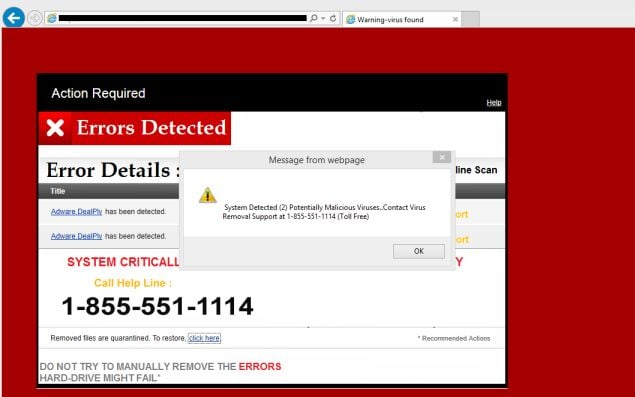
Fake Important Security Alerts - SofTech Computer Repair in Prescott discusses how to deal with this popup message when using the internet

Fake security alerts - Malware removal from SofTech Computer Repair in Prescott
Have you ever been browsing the internet and get a message that says "your computer is infected" or "important security alert" message? These messages are actually fake notifications attempting to gain access to your computer or obtain your credit card information.

These alerts are shown in such a way as to trick the computer's user into thinking their computer has crashed or that a virus has been detected on the computer. It does this to try and scare the infected user into calling one of the listed numbers in order to receive support. In reality they will only be greeted with people who are trying to sell them unneeded support contracts and services.

What should you do if you see this warning?

First off, do not call any phone numbers on the screen, and do not enter any contact information into the popup.

Usually this popup comes as the result of browsing the internet and are simple javascript popup messages. Simply closing the browser window or pressing the "ESC" key on your keyboard will cause the message to disappear, however many times the popup usually returns shortly after if you remain on the web page.

How do you get the popup to go away?

We have seen this popup many times. The easiest way to escape this popup message trap is to hover your mouse pointer over the browser's close button, hit the "ESC" key on your keyboard, then quickly click the mouse button to close the browser.

This may take some practice, however this is the simplest and fast way to avert the announcing popup loop.

What if this does not work?

If the above mentioned steps above do not work, your computer could be infected by other malware. It is important to have your computer checked for malicious malware as soon as possible.

SofTech Computer Repair in Prescott is available to help you though this issue! Do you have persistent computer issues? Contact us today about our computer maintenance plan. Call us today, 928-443-8770 or learn more at http://www.softechcomputers.com/?p=15633795825629a4e400e05

More Information:
Malware Removal in Prescott
Prescott Computer Repair
Helpful Computer Articles

Tuesday, May 16, 2017

Ransomware, what is it? Tips to prevent this computer attack from Softech Computer Repair in Prescott

Ransomware infections - malware removal in Prescott by Softech Computers
Ransomware is a type of malicious software, once installed on your computer, it blocks access to your files until a "ransom" is paid allowing you to regain access to your files. No one wants to find a message on their computer screen informing them that someone has control over their files and is requesting payment to unlock it. Unfortunately, simple ransomware may lock the system in a way which is not difficult for a knowledgeable person to reverse. More advanced malware encrypts the victim's files, making them inaccessible, and demands a ransom payment to decrypt them. Softech Computer Repair in Prescott brings you these tips to prevent a ransomware attack.

How should you protect yourself from Ransomware? We suggest:
  • Installing an antivirus program and keep the updates current.
  • Making sure your operating system software is automatically updated.
  • You should not open attachments or emails from people you don't know or companies you have not done business with.
  • Avoid clicking links in emails you receive. Open a browser and go to the website directly and login to see messages.
  • Be sure your browser is secure by enabling smart screen (in Internet Explorer), and keep your web browser's pop-up blocker running.
  • Backup your important files.

If you have been victim of Ransomware, now what?

There is no one-size-fits-all response if you have been victimized by ransomware. There is no guarantee that paying the ransom will give you access to your files again. Giving into demands could also make you a target for more malware.

You should seek the advice of a professional to limit data loss.

Also, once you have removed the ransomware infection from your computer, you can restore previous, unencrypted versions of your files using "version history".

For more tips on preventing malware, including ransomware infections, you should contact SofTech Computer Repair in Prescott! We would be happy to help you deal with all your computer issues, call 928-443-8770 or visit our website at http://www.softechcomputers.com.


More Information:
Virus Removal in Prescott
Prescott Computer Maintenance
SofTech Computer Repair in Prescott on Facebook!